A Visitor Enquiry allows you to find a visitors Golf ID via a club and name search (Refer Part 1 below)
The Visitor Enquiry also allows you to verify the name details of a Visitor if you already have their Golf ID (refer Part 2 below)
PART 1
Find a Visitors Golf ID
From the Main Menu select:
- Golf Australia
- Visitor Enquiry
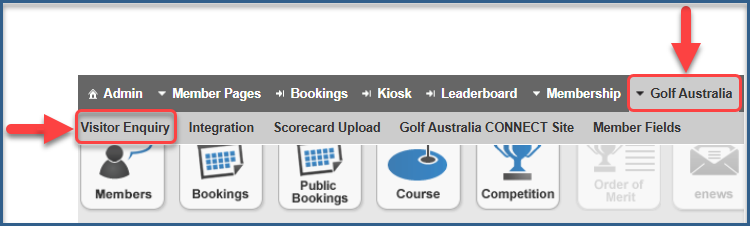
From the options select:
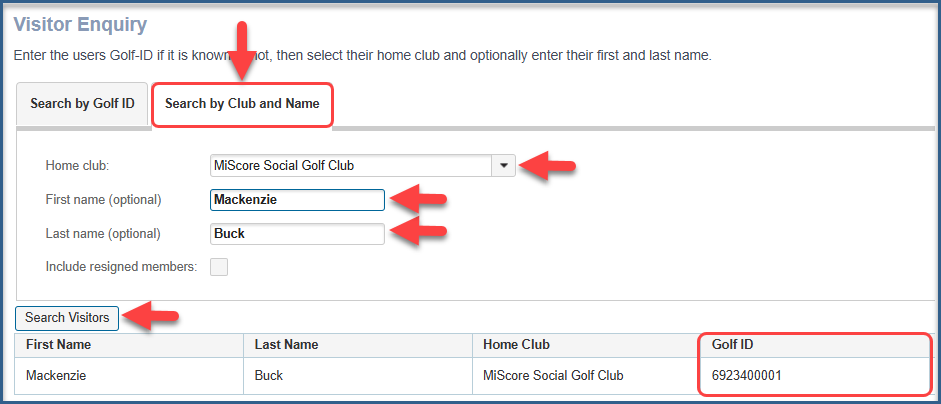
- Search by Club and Name:
- Enter the name of the Visitors Home Club
- Enter First and Last Name
- Search Visitors
- Enter First and Last Name
- Enter the name of the Visitors Home Club
The Visitors Golf ID will be displayed
Part 2
Verify the name details of a Visitor using their Golf ID:
From the Main Menu select:
- Golf Australia
- Visitor Enquiry
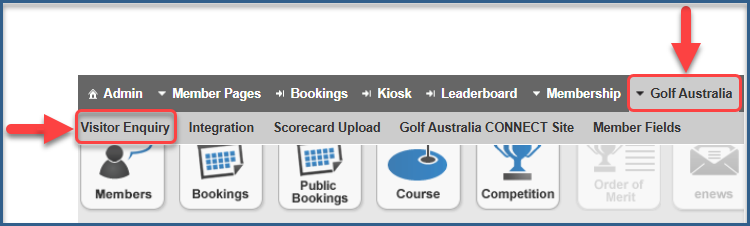
From the options select:
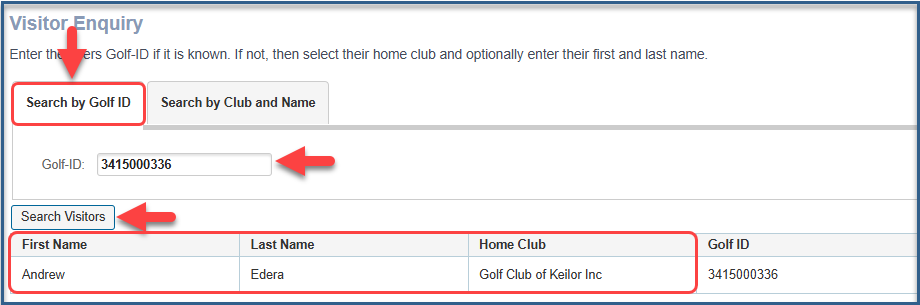
- Search by Golf ID:
- Enter the Visitors Golf ID
- Search Visitors
- Enter the Visitors Golf ID
The Visitors Name and Home Club will be displayed

Was this article helpful?
That’s Great!
Thank you for your feedback
Sorry! We couldn't be helpful
Thank you for your feedback
Feedback sent
We appreciate your effort and will try to fix the article